
Mapper代理开发
Mapper代理开发
在Mybatis原生代码中,原生代码还是存在一些硬编码,使用Mapper代理开发可简化后期执行SQL。
所以通过使用Mapper代理开发,会更加方便
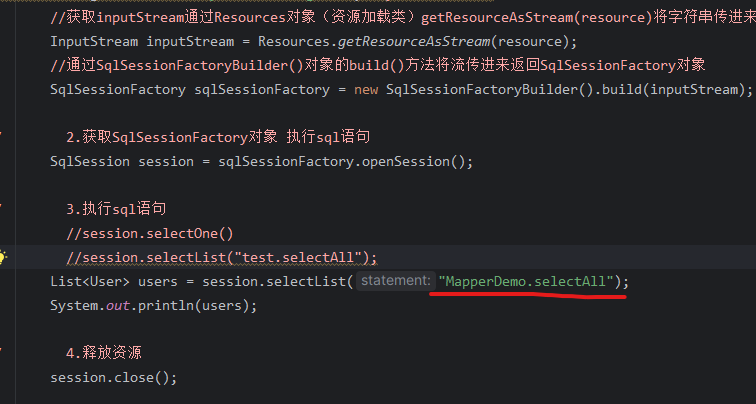
使用Mapper代理开发流程
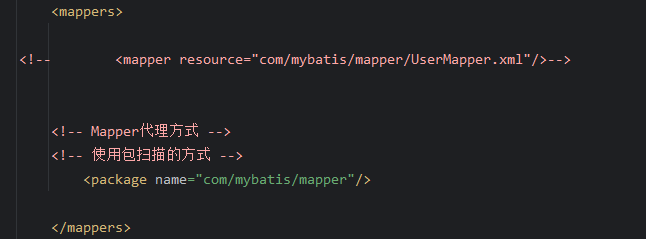
定义与SQL映射文件同名的Mapper接口,将Mapper接口和SQL映射文件位置放在同一目录下
- 在
resources下创建与java目录下com.xxx.mapper一致 resources下创建时为com/xxx/mapper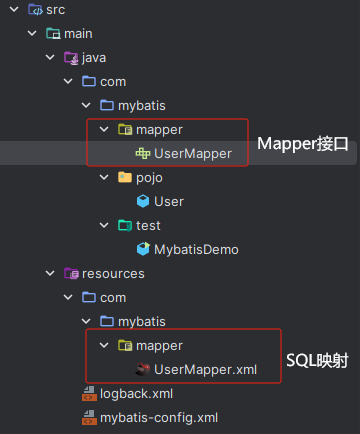
- 在
设置SQL映射文件的namespace属性为Mapper接口全限定名
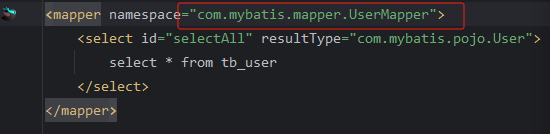

- 这边推荐IDE中MybatisX插件 可用来快速跳转和探究是否已映射上
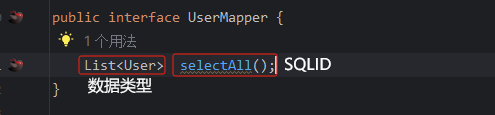
在Maooer接口中定义方法,方法名为SQL映射文件中sql语句的ID,并保持参数类型和返回值一致
1
2
3
4
5
6
7
8
9
10
11
12
13
14
15
16
17
18
19
20
21
22
23
public class MybatisDemo2 {
public static void main(String[] args) throws IOException {
// 1.加载mybatis核心配置文件,获取SqlSessionFactory Mybatis官方网站有
String resource = "mybatis-config.xml";//mybatis相对路径
//获取inputStream通过Resources对象(资源加载类)getResourceAsStream(resource)将字符串传进来 返回一个字节输入流
InputStream inputStream = Resources.getResourceAsStream(resource);
//通过SqlSessionFactoryBuilder()对象的build()方法将流传进来返回SqlSessionFactory对象
SqlSessionFactory sqlSessionFactory = new SqlSessionFactoryBuilder().build(inputStream);
// 2.获取SqlSessionFactory对象 执行sql语句
SqlSession session = sqlSessionFactory.openSession();
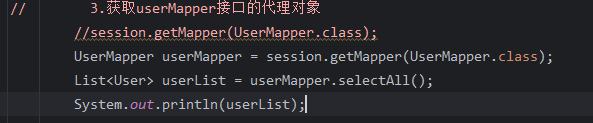
// 3.获取userMapper接口的代理对象
//session.getMapper(UserMapper.class);
UserMapper userMapper = session.getMapper(UserMapper.class);
List<User> userList = userMapper.selectAll();
System.out.println(userList);
// 4.释放资源
session.close();
}
}

本博客所有文章除特别声明外,均采用 CC BY-NC-SA 4.0 许可协议。转载请注明来自 NIGZLA!